
You have dozens of accounts. There is no way you can remember all those passwords. A password manager solves that problem!
I wrote an article on the subject in 2022. It has aged. The tools have changed, the threats have changed too, and I asked the question on LinkedIn to see where we stand.
What you told me
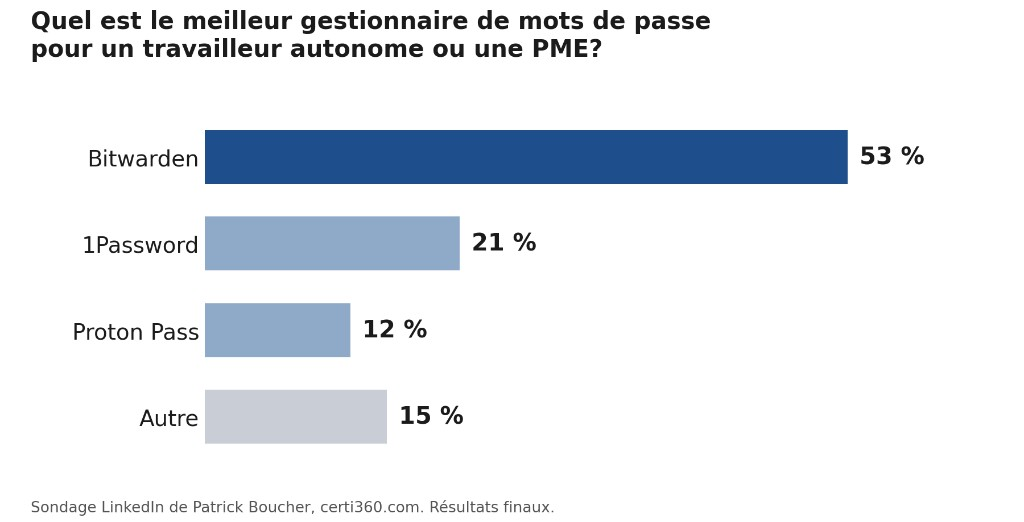
Bitwarden wins by a wide margin, with more than half the votes. 1Password comes next, followed by Proton Pass. Fifteen per cent of respondents made another choice. Percentages are rounded. This was a LinkedIn survey, not a scientific study.
The question assumed that people already use a dedicated password manager. If you still use your browser’s manager, a KeePass file, or an Excel spreadsheet, this article is for you.
What is a password manager?
Think of a key ring. Instead of carrying 50 keys, you keep only one: the master key. Everything else stays in the vault.
In practical terms, it is an application that:
- stores all your passwords in an encrypted vault;
- creates a long, unique code for every website;
- fills in your credentials for you on the right sites;
- unlocks with a single password, your master password.
You remember one phrase. The application remembers the rest.
Why use one?
The real problem is human. With dozens of accounts, we end up reusing the same password, or a small variation, on several websites. One breached site can then open the door to others because attackers try stolen credentials elsewhere.
A password manager helps you:
Use a different password for every site. If one site is compromised, your other accounts do not share the same secret.
Use long passwords that are difficult to guess. You do not have to memorize or type them, so they can be long and random.
Protect yourself from phishing. The vault associates a credential with the right domain. If it does not fill anything in on a fraudulent copy, take that warning seriously.
Share securely. You can share the Wi-Fi, accounting, or shared-account password without email or text messaging.
Use it on all your devices. Phone, computer, and tablet.
What about my browser or my Google, Microsoft, or iCloud account?
It is better than nothing. It is certainly better than a sticky note or a “passwords.xlsx” file. The manager is included at no additional cost, already installed, and easy to use.
It still has limitations:
- In a personal account, your work and private credentials get mixed together.
- An employer cannot administer or revoke those credentials when someone leaves. Chrome and Edge can be managed through enterprise policies, but only if that management is configured and the account belongs to the organization.
- Information-stealing malware frequently targets credentials stored in web browsers.
- If your credentials or passkeys are synchronized through a platform account, compromise of that account can put them at risk or, depending on the protections in place, allow them to be recovered on an attacker-controlled device. NIST recommends strong authentication and secure recovery methods for this type of account.
A client also pointed out that many small businesses keep a shared KeePass file. KeePass is solid for personal or offline use. In a team, a shared file provides neither per-entry permissions nor individual identities: everyone opens the same file with the same master password. It becomes impossible to know who accessed what, and difficult to remove access when someone leaves.
Two features that changed the game
Built-in rotating codes. Several managers can generate the six-digit two-factor authentication code, also known as a TOTP code. You no longer need a separate application for the accounts you choose to keep there. The vault fills in the password and the current code. There is a trade-off: for critical accounts such as your bank, primary email, or administrator account, keep the second factor elsewhere, on a physical key or another device.
Passkeys. A passkey replaces a password with a cryptographic key pair. The public key stays with the website, while the private key remains on your device or in your synchronization service. To sign in, you unlock access with your fingerprint, face, or PIN. Passkeys are phishing-resistant because they are bound to the site that created them, but they do not eliminate every form of account takeover. The leading managers can now create and synchronize them. When a site offers you one, it is generally a better choice than a password.
How to choose a good password manager
Ask these questions:
- Does encryption happen on your device? The provider should not know your master password or be able to read your vault.
- Can you enable two-factor authentication on the vault? Otherwise, everything rests on a single phrase.
- Is the provider transparent? Look for a public third-party attestation, such as ISO 27001 or a SOC 2 Type 2 report, as well as a clear incident history.
- Are updates released quickly? Unmaintained security software becomes a risk.
- Are TOTP codes and passkeys included in the plan you are considering?
- Does it work well on all your devices? If it is a nuisance to use on your phone, you will eventually abandon it.
- For a business, does it provide real administration? Look for a central console, logs, and a reliable way to remove access. SSO simplifies authentication, but it must be paired with SCIM, a directory connector, or equivalent lifecycle controls to remove access when an employee leaves.
One reminder from 2022 still holds true: no provider is immune. In 2022, LastPass experienced two related incidents. The first exposed source code and technical information. Those materials later helped the attacker access backups containing customer metadata, some unencrypted data, and encrypted sensitive vault fields. A long, unique master password strengthens the protection of your encrypted vault. Choose a long phrase and never reuse it.
My recommendations
To get started, on your own or with your family: Bitwarden. It offers a free version, its code is open source, and it was the majority choice in my survey. Proton Pass is a good alternative and also offers a free version.
For a small business: Bitwarden, 1Password, or Proton Pass. All three provide administration features, but not every feature is included in every plan. For example, Bitwarden SSO requires Enterprise, while SCIM is available with Teams and Enterprise. Bitwarden’s integrated TOTP generation requires Premium or a paid organization. 1Password Business provides Unlock with SSO and automated SCIM provisioning. At Proton Pass, the currently documented offering for SSO and SCIM is Pass Professional, with a three-user minimum. Always check the plan you are considering. For mature team management, 1Password remains my preference.
To buy from a Quebec company: Devolutions, based in Lavaltrie. Devolutions Password Manager is its credential-management application. For a centralized team workspace, it connects to Devolutions Cloud or to Devolutions Server, which can be self-hosted.
KeePass: for personal, offline, or highly technical use.
LastPass: I no longer recommend it.
Prices and features change. Check the provider’s website before making your choice.
What to do this week
- Choose a manager from the list above and install it on your computer and phone.
- Create a master password: a unique phrase of at least four or five words that you do not use anywhere else.
- Enable two-factor authentication on the vault itself.
- Move the 10 accounts that matter most first: primary email, banking, Microsoft or Google, Apple, taxes, and social media.
- Replace the password on those 10 accounts with one generated by the tool, then enable two-factor authentication or a passkey when available.
You do not need to change your master password every three months. NIST recommends against arbitrary periodic password changes. A change should instead be required when there is evidence that the authenticator has been compromised.
So, what now?
The best password manager is the one you use every day. Choose one this week.