
2026 update: this 2022 article remains online for reference, but its recommendations have been replaced by the new guide: Password managers: what are they, why use one, and which should you choose?.
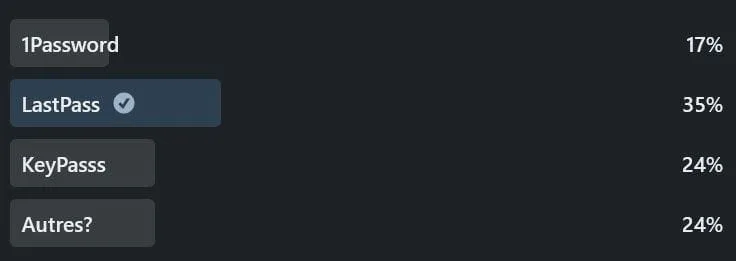
A few days ago I asked a question on the LinkedIn platform, namely what would be the best choice for a password vault application.
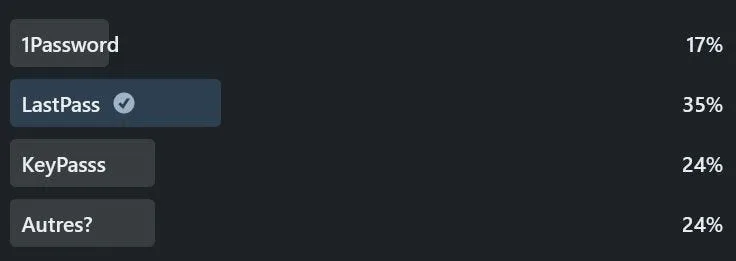
Survey results on LinkedIn
Emergency – have a password vault!
Each of us has dozens of passwords for the different sites we visit, be it Facebook, Twitter, Medium, Google, Amazon and all the rest.
Without a password management solution, you’re likely to be using the same passwords for several websites, or a variation of them from one site to another.
I don’t think anyone can properly manage their passwords and access codes without a vault to organize them and find them quickly.
Your accesses are then at risk of compromise!
A password vault is an application for storing the various access codes to your websites.
I hope that if you don’t already have a password vault, that at the end of this article you’ll go and get one!
Basic features of a password vault!
Password management applications must have the following minimum functionalities:
- Strong encryption in transit;
- Strong encryption in storage;
- No retention of master password;
- Encrypt information from the user’s workstation;
- Ability to generate complex passwords on demand;
- Enables double authentication to open the vault;
- Fast maintenance and updates;
- Individual or team access logging;
- Transparency in terms of protection, security measures and breaches through the distribution of their ISO27001 certificates or SOC2 Type 2 report.
Key players
1Password– https://1password.com/sign-up/ca/LastPass – https://www.lastpass.com/KeyPass – https://keepass.info/Bitwarden – https://bitwarden.com/Dashlane– https://www.dashlane.com/
Good software costs money!
One of the first things not to consider is free options.
We’re talking about the security of your login information, which is hyper-important to protect in order to prevent identity theft.
Please, pay for the tools to give software publishers the means to make good applications and implement the necessary protections against attacks.
Reflecting on different options
1Password
- 47/year
- Easy-to-use, local storage option
- Emergency kit available
- Highly granular access management
- Automating secrets for APIs
- A travel mode allows you to keep only certain accounts on your phone while away from home.
- Darkweb & information leak detection included
- The developer “AgileBits Inc.” has its offices in Toronto, making it the only Canadian choice.
LastPass
- The most popular option, since it had a free option, but this is no longer available. (You can no longer use the application on your mobile and laptop at the same time).
- 47 / year
- Easy-to-use, local application option
- Multiple authentication possible (unique code for logging on)
- SOC2 type 2
- Darkweb & information leak detection included
Keeper Password Manager
- 44.67/year
- Advanced usage report
- SOC2 type 2 and ISO27001
- The most expensive option, several other functions exist, but at an additional cost, such as information leak detection.
- Offers the most storage space for files to be kept.
- Chat tools included
KeePasss
- Free, open-source solution
- This option represents the local option par excellence, being the free and open code option. The software is widely used in environments without Internet access, or for those who do not wish to place their passwords in a cloud environment.
- A number of third-party tools offer both browser integration and browser integration, which in my opinion increases the risk of compromise.
- Encryption of the entire database, not just the entries, thus preventing any part of it from being shared.
- No administration console
- No help desk (other than public forums)
- Given the lack of native cloud backup, people tend to put it on OneDrive, DropBox, Sync or Google Drive.
BitWarden
- 13/year and free option
- Easy to use
- No security certification
- Represents the latest in free and open-source solutions.
Dashlane
- 52 / year
- Very easy to use
- No security certification
- Enables us to store a backup copy on our own equipment
- No advanced administration rules such as role delegation or ability to impose usage policies
Other options for companies?
The options presented above are aimed at the general public. If your business is larger, or especially if you’d like to integrate with other options, the following software solutions may be of interest to you:
ItGlue – https://www.itglue.com/Zoho Vault – https://www.zoho.com/vault/Devolution– https://devolutions.net/password-hub
The minimum to protect you!
1) Have a complex master password
Make sure you have a “master password”, the one to open your password vault, long and complex. Like a sentence.
Each site has its own password, as complex as possible, so let the password manager remember it and log you in automatically afterwards.
2) Enable two-factor authentication (2FA)
Whenever possible, activate two-factor authentication. This validation is not only available for opening your password vault, but also for the sites you visit.
Two-factor authentication provides you with a code, usually 6 digits long, either via a text message (SMS) on your cell phone or via an application (Authy, Google Authenticator, etc.). This code usually lasts for one minute.
3) Be alert to phishing attacks
Attackers have your e-mails, you’ll receive messages asking you to validate your information or confirm your subscriptions, don’t click on suspicious links.
4) Keep your system clean
Your system must be hygienically safe, with updates applied promptly and a security solution installed on your system (Antivirus, etc.).
Choosing a solution – Suggestions
Having looked at the various options, none of them stand out significantly, and the support offered by the different options is similar, except for KeePass, which remains supported only by the community.
LastPasss is the only organization that seems to have suffered security breaches in 2011and 2015. It has since been discouraged due to its practices and the concerns that have been highlighted.(protonPass blog)
If you’re a beginner, the Bitwarden option seems appropriate, given its simplicity and options for individuals.
For small businesses, however, my choice is 1Password or Keeper Password Manager.
Remember that the future of the password manager market is in turmoil, with companies buying, selling and merging solutions, making the market unpredictable at the moment.
Password manager software vendors offer other options, some of which integrate chat, file sharing, desktop management, login activity monitoring and more.
Our secret codes on cloud computing or not?
Of course, there are those who don’t trust cloud solutions. I don’t blame them! Because once our data is on a website, it’s impossible to know whether it will be read, modified, transmitted or directly decrypted.
Furthermore, has the company that manages and controls my codes put in place the necessary security to protect my secrets? Why do we ask for significant transparency in order to maintain a level of trust?
Risk of using a cloud vault
Here are some of the risks associated with using a cloud service:
All sensitive data in one place. You’ve probably heard about the need not to put all your eggs in one basket. That’s exactly what you’ll do with a password manager.
Backup is not always possible. If the server goes down, you need a local copy. This copy should have the same security measures as the cloud version.
Not all devices are sufficiently secure. Hackers exploit the same vulnerability to obtain all your credentials in a single attack. Password managers can be hacked if your device is infected by malware.
Wrong choice of password manager. If its encryption is weak, if it offers few features and if the reviews are bad, you shouldn’t use it.
Forgot your master password. You’re the only one who knows it, and your password manager doesn’t have a reset function.
Personally, I think the benefits of using cloud services outweigh the risks, but I’m open to arguments.
Write me your arguments!
Security breach history
Worried about putting all my secret codes in one place, I looked at the history of security breaches and vulnerabilities in the various solutions.
2014 – Vulnerability discovered in the LastPass application by researchers Zhiwei Li, Warren He, Devdatta Akhawe, and Dawn Song.
2015 – The KeeFarcetool is released to extract passwords from the Keepass tool.
2015 – LastPass systems breached, hackers stole information(but not encrypted data)
2016- Multiple vulnerabilities discovered in all password management applications by “TeamSIK – Security is Key“.
2016 – Google Project zero – Tavis Ormandy discovers vulnerabilities that can compromise an account.
2017 – Again Tavis Ormandy discovers a vulnerability in the browser extension. LastPasseannounces itpublicly.
2017 – A vulnerability is discovered by Tavis Ormandy in the Keeper tool.
2019 – Windows 10 users were vulnerable if malware was installed on their workstations. This compromised the passwords of several password managers.
2020 – New vulnerabilities have been discovered in several password managers.
The good news is that none of these vulnerabilities led to the loss of secret codes.
To read more on the subject
The Best Password Managers Our pick Budget pick Collapse all Wirecutter has been testing and recommending password managers since 2016. Thorin…www.nytimes.com 10 Best Password Managers (2022): Safe, Easy to Use + Cheap Katarina Glamoslija Updated on: March 1, 2022 I tested 52 of the top password managers to find the absolute best for…www.safetydetectives.com Best Password Managers For Windows In 2022 It’s unwise to use the same password for all of your digital accounts and services, but it’s also a huge pain to try…www.forbes.com